> ## Documentation Index
> Fetch the complete documentation index at: https://danswer-docs-versions-opensearch-example.mintlify.site/llms.txt
> Use this file to discover all available pages before exploring further.
# Gong
> Index the transcripts of the calls recorded in Gong
The Gong connector indexes the transcripts of the calls in your Gong account through the Gong API.
It signs in with a Gong API key, and it can be limited to selected workspaces.
## What gets indexed
Onyx creates one document for each call that has a transcript in Gong. A document holds:
* The call's title, which becomes the document title
* The call's description, when the call has one
* The transcript, one paragraph per turn, each labeled with the speaker's name and email address as Gong lists them.
A speaker Gong cannot identify is labeled **Unknown**.
The document links to the call in Gong and carries the call's start time as its date.
It also stores the system that recorded the call, such as Zoom, as metadata.
### What is not indexed
* Calls that Gong has not transcribed
* The audio and video recordings themselves
* Gong's own summaries, highlights, trackers, and points of interest
* Comments, notes, and scorecards left on a call
* Attendees as metadata. The parties on a call are used only to name the speakers in the transcript.
## How it works
Onyx asks Gong for the transcripts of calls that started since its last run,
and it reads one page of transcripts at a time. The first run reads every call in the account,
or in the selected workspaces, unless [a start date](#limit-how-far-back-onyx-reads) is set.
* **Refresh**. The default refresh interval is **30 minutes**.
Each refresh also rereads the day before the last run,
so a call that ended late or that Gong transcribed late is still picked up.
* **Calls Gong is still processing**. Gong sometimes lists a transcript before it serves the call's details.
Onyx keeps such a call and retries it over the next 15 minutes or so.
A call that never resolves is reported as a failed document for that run.
* **Rate limits**. Gong allows 3 API calls per second and 10,000 per day for the whole company.
Onyx spaces its requests to stay under the per-second limit and waits as long as Gong asks when it is throttled.
A first index of a large account shares the daily allowance with your other Gong integrations.
* **Deleted calls**. A call deleted in Gong stays in Onyx until a pruning run removes it.
A prune rereads every transcript the connector covers, so it spends API allowance like a first index.
Keep the pruning interval long on a large account.
## Before you begin
You need:
* An Onyx administrator account.
* A Gong user with the **Technical Administrator** role. Only a technical administrator can create an API key.
API keys are available on every Gong plan.
* For an account with data residency outside the US, your region's API address.
Gong shows it on the same page where you create the key.
The API key has the access of the whole company, so Onyx can read every call the account holds.
Use the **Workspaces** setting in Onyx to narrow that. Onyx does not support **Auto Sync Permissions** for Gong,
so choose the access type with that in mind.
## Create a Gong API key
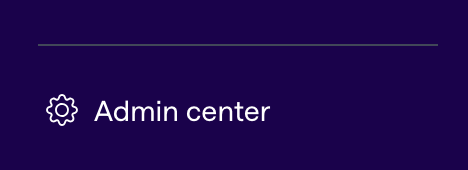
Sign in to Gong as a technical administrator. In the left sidebar, select **Admin center** at the very bottom.
Expand the sidebar first if it is collapsed. Only technical administrators see this entry.
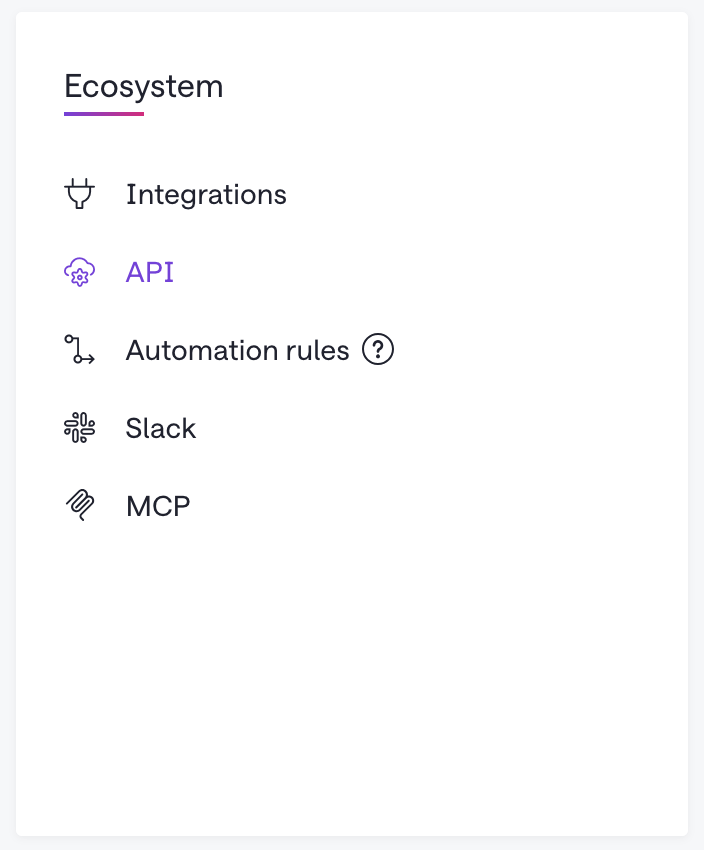
 Find the **Ecosystem** section and select **API**.
 Click "+ Get API Key" and enter the required fields in the form.
Once you're done filling out the keys, click the "Get API key" button.
The dialog box will show you the created access key and secret.
Gong shows the access key and the secret just once. Copy both before you close the dialog.
Gong does not show the secret again; if you lose it, create a new key.
On the same API page, Gong shows the base URL for your company's API calls. The default is `https://api.gong.io`.
An account with data residency in another region uses a host such as `https://.api.gong.io`.
Note it if it differs from the default.
See Gong's guide to [managing API keys](https://help.gong.io/docs/receive-access-to-the-api).
## Configure the connector in Onyx
In Onyx, go to **Admin Panel → Add Connector** and select **Gong**.
Select **Create New** and enter:
* **Gong Access Key** and **Gong Access Key Secret**: the pair you copied from Gong.
* **Gong API Base URL**: leave it empty for `https://api.gong.io`. For an account outside the US,
enter your region's host, such as `https://eu.api.gong.io`.
Onyx accepts only `api.gong.io` and hosts under it, over HTTPS.
It adds `https://` when the scheme is missing and drops a trailing slash.
Name the connector. In **Workspaces**, list the workspaces to index, one per entry,
or leave the list empty to index every workspace in the account.
Each entry is a workspace's ID or its exact name as shown in Gong. The name is case sensitive.
An entry that matches nothing is skipped,
and the connector fails with **No valid Gong workspaces found** when no entry matches.
**Public** shows every indexed call to all Onyx users. **Private** limits them to selected Onyx user groups.
See [Document Access Controls](/admins/connectors/overview#document-access-controls) for what each means.
**Auto Sync Permissions** is not available for Gong.
Select **Create Connector**. Onyx starts indexing.
Open **Admin Panel → Existing Connectors**, select the connector,
and check that the first indexing attempt finishes with about the number of calls you expect.
A large account takes a while, since Gong serves transcripts a page at a time under its rate limits.
## Limit how far back Onyx reads
By default the first index reads every call in the account.
On a self-hosted deployment you can set a date before which Onyx does not look.
Add this variable to your Onyx `.env` file, then restart Onyx.
See [Configuration](/deployment/configuration/configuration) for where that file lives in your deployment.
```bash .env theme={null}
GONG_CONNECTOR_START_TIME=2025-01-01T00:00:00
```
The value is a date and time in ISO 8601 format, read as UTC. It applies to every Gong connector in the deployment,
to indexing and to pruning alike. Calls before the date that are already in Onyx stay until the next pruning run,
which then removes them.
## Troubleshooting
| Message or symptom | Cause and fix |
| - | - |
| 401 Unauthorized | The access key or secret is wrong, or the key expired or was deleted in Gong. Create a new key and update the credential. |
| 403 Forbidden | The key's **Trusted IPs** list does not include the address Onyx connects from. Clear the list in Gong, or add the address. |
| gong\_base\_url must use https, or must be a Gong API host | The **Gong API Base URL** is not an `api.gong.io` host, or it starts with `http://`. Enter the host Gong shows on its API page, over HTTPS. |
| No valid Gong workspaces found | No entry in **Workspaces** matches a workspace ID or exact name. Names are case sensitive. Copy the name from Gong, or clear the list to index every workspace. |
| Couldn't get call details after 6 attempts for Call ID … | Gong listed the transcript but did not serve the call's details in time. The next refresh picks the call up if it started within the last day. Otherwise, or if the same call keeps failing, check the call in Gong and then run a complete re-index. |
| Indexing is slow, or the run stops for a long time | Gong is throttling the company's API use. Onyx waits as long as Gong asks before it retries. Once the daily allowance of 10,000 calls is spent, the wait lasts until Gong resets it. Other integrations on the same Gong account share that allowance. |
| A speaker is labeled **Unknown** | Gong has no name or email address for that party. This is common for external participants that Gong did not match to a contact. |
| Old calls are missing | `GONG_CONNECTOR_START_TIME` is set on the deployment, or the calls are in a workspace the connector does not list. Also check that the calls have transcripts in Gong. |
| Recent calls are missing | Gong transcribes a call some time after it ends. Wait for the next refresh; each refresh rereads the previous day. A workspace name changed in Gong also breaks a connector that lists it by name, so prefer the ID for a long-lived connector. |
| A call deleted in Gong still appears in Onyx | Deleted calls leave Onyx when a pruning run removes them. Check the pruning interval under the connector's advanced settings, or run a prune from the connector's page. A prune rereads every transcript, so expect it to take as long as a first index. |
This documentation is built and hosted on [Mintlify](https://mintlify.com), a developer documentation platform.
Click "+ Get API Key" and enter the required fields in the form.
Once you're done filling out the keys, click the "Get API key" button.
The dialog box will show you the created access key and secret.
Gong shows the access key and the secret just once. Copy both before you close the dialog.
Gong does not show the secret again; if you lose it, create a new key.
On the same API page, Gong shows the base URL for your company's API calls. The default is `https://api.gong.io`.
An account with data residency in another region uses a host such as `https://.api.gong.io`.
Note it if it differs from the default.
See Gong's guide to [managing API keys](https://help.gong.io/docs/receive-access-to-the-api).
## Configure the connector in Onyx
In Onyx, go to **Admin Panel → Add Connector** and select **Gong**.
Select **Create New** and enter:
* **Gong Access Key** and **Gong Access Key Secret**: the pair you copied from Gong.
* **Gong API Base URL**: leave it empty for `https://api.gong.io`. For an account outside the US,
enter your region's host, such as `https://eu.api.gong.io`.
Onyx accepts only `api.gong.io` and hosts under it, over HTTPS.
It adds `https://` when the scheme is missing and drops a trailing slash.
Name the connector. In **Workspaces**, list the workspaces to index, one per entry,
or leave the list empty to index every workspace in the account.
Each entry is a workspace's ID or its exact name as shown in Gong. The name is case sensitive.
An entry that matches nothing is skipped,
and the connector fails with **No valid Gong workspaces found** when no entry matches.
**Public** shows every indexed call to all Onyx users. **Private** limits them to selected Onyx user groups.
See [Document Access Controls](/admins/connectors/overview#document-access-controls) for what each means.
**Auto Sync Permissions** is not available for Gong.
Select **Create Connector**. Onyx starts indexing.
Open **Admin Panel → Existing Connectors**, select the connector,
and check that the first indexing attempt finishes with about the number of calls you expect.
A large account takes a while, since Gong serves transcripts a page at a time under its rate limits.
## Limit how far back Onyx reads
By default the first index reads every call in the account.
On a self-hosted deployment you can set a date before which Onyx does not look.
Add this variable to your Onyx `.env` file, then restart Onyx.
See [Configuration](/deployment/configuration/configuration) for where that file lives in your deployment.
```bash .env theme={null}
GONG_CONNECTOR_START_TIME=2025-01-01T00:00:00
```
The value is a date and time in ISO 8601 format, read as UTC. It applies to every Gong connector in the deployment,
to indexing and to pruning alike. Calls before the date that are already in Onyx stay until the next pruning run,
which then removes them.
## Troubleshooting
| Message or symptom | Cause and fix |
| - | - |
| 401 Unauthorized | The access key or secret is wrong, or the key expired or was deleted in Gong. Create a new key and update the credential. |
| 403 Forbidden | The key's **Trusted IPs** list does not include the address Onyx connects from. Clear the list in Gong, or add the address. |
| gong\_base\_url must use https, or must be a Gong API host | The **Gong API Base URL** is not an `api.gong.io` host, or it starts with `http://`. Enter the host Gong shows on its API page, over HTTPS. |
| No valid Gong workspaces found | No entry in **Workspaces** matches a workspace ID or exact name. Names are case sensitive. Copy the name from Gong, or clear the list to index every workspace. |
| Couldn't get call details after 6 attempts for Call ID … | Gong listed the transcript but did not serve the call's details in time. The next refresh picks the call up if it started within the last day. Otherwise, or if the same call keeps failing, check the call in Gong and then run a complete re-index. |
| Indexing is slow, or the run stops for a long time | Gong is throttling the company's API use. Onyx waits as long as Gong asks before it retries. Once the daily allowance of 10,000 calls is spent, the wait lasts until Gong resets it. Other integrations on the same Gong account share that allowance. |
| A speaker is labeled **Unknown** | Gong has no name or email address for that party. This is common for external participants that Gong did not match to a contact. |
| Old calls are missing | `GONG_CONNECTOR_START_TIME` is set on the deployment, or the calls are in a workspace the connector does not list. Also check that the calls have transcripts in Gong. |
| Recent calls are missing | Gong transcribes a call some time after it ends. Wait for the next refresh; each refresh rereads the previous day. A workspace name changed in Gong also breaks a connector that lists it by name, so prefer the ID for a long-lived connector. |
| A call deleted in Gong still appears in Onyx | Deleted calls leave Onyx when a pruning run removes them. Check the pruning interval under the connector's advanced settings, or run a prune from the connector's page. A prune rereads every transcript, so expect it to take as long as a first index. |
This documentation is built and hosted on [Mintlify](https://mintlify.com), a developer documentation platform.